MSI PRO MP165 E6 CT 16-inch Review: FHD IPS Portable Monitor — 60Hz, 4ms & Built-in Speakers
 Enterthedeals
 MSI PRO MP165 E6 16" Portable Monitor
MSI PRO MP165 E6 CT 16-inch Review: FHD IPS Portable Monitor — 60Hz, 4ms & Built-in Speakers
Introduction
The MSI PRO MP165 E6 CT is a compact, business-oriented portable monitor marketed under MSI’s PRO series. Designed for mobile professionals, remote workers, and anyone who needs a secondary screen on the go, this model combines a Full HD IPS panel, a slim frameless design, basic integrated audio and a variety of connectivity options — all at an unusually low advertised price ($49.99, Costco exclusive model). This review covers appearance and construction, key specifications, real-world usage across scenarios, pros and cons, and a final recommendation.
Product Overview
Manufacturer: MSI (Micro-Star International)
Product category: Portable business/monitoring display (portable monitor)
Intended use: Secondary screen for productivity (documents, spreadsheets, email), travel/remote work, casual media consumption, basic console or mobile device display via HDMI/USB-C. Not intended as a color-critical creative reference monitor.
Appearance, Materials & Design
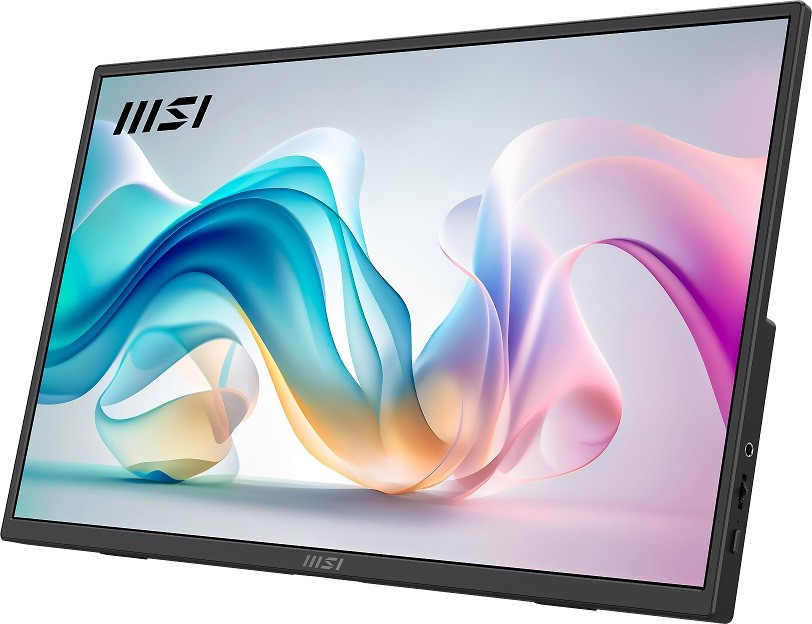
The PRO MP165 E6 CT is presented in an ultra-slim, frameless style with narrow bezels that help maximize usable screen area. The front uses a matte anti-glare IPS panel which reduces reflections and fingerprints compared with glossy alternatives. The chassis is lightweight and feels predominantly plastic — typical for ultra-portable monitors — with a matte finish that keeps it looking business-like and unobtrusive.
Notable design elements:
- Frameless (narrow bezel) front to maximize perceived screen size and reduce distraction.
- Lengthened kickstand that supports a 0°–90° tilt range — useful for working on a desk or propping the display up on uneven surfaces.
- Integrated tripod socket (1/4″) — handy for content creators or photographers who want to mount the monitor on a tripod.
- L-shaped cable design to reduce desk clutter and minimize strain on connector ports.
- VESA 75 x 75 mm mounting pattern for monitor arms or wall mounts — adds flexibility in stationary setups.
Key Features & Specifications
- Panel: 15.6″ (marketed as 16″) IPS, 16:9 aspect ratio
- Resolution: Full HD 1920 x 1080
- Refresh rate: 60 Hz
- Response time: 4 ms (GTG)
- Contrast ratio: 1000:1
- Color gamut: sRGB ~49.51% (CIE 1976) — limited color coverage
- Eye comfort: Anti-glare coating, anti-flicker, Less Blue Light, MSI EyesErgo and Eye-Q Check features
- Speakers: 2 x 1W built-in speakers
- Inputs: 1 x HDMI 2.0b, 2 x USB-C (DisplayPort 1.2 Alt Mode signal) — Type-C supports 15W power delivery / power input
- External USB power supported via Type-C interface
- Mounting: 1/4″ tripod socket and VESA 75 x 75 mm
- Adjustability: Tilt 0°–90°
- Form factor: Ultra-slim portable monitor, frameless design
- Model notes: Costco exclusive model; additional MSI EyesErgo utilities available online
- Price: $49.99 (advertised)
Experience & Performance in Real-World Scenarios
Productivity & Office Use
As a second screen for email, spreadsheets, PDF reading and general office work, the PRO MP165 E6 CT performs well. The Full HD resolution on a 15.6″ panel yields comfortable text clarity, and the anti-glare finish improves legibility under overhead lighting. The tilt range and VESA compatibility make it easy to position for multi-monitor setups or ergonomic laptop + monitor stations.
The built-in Eye-Q features, anti-flicker and less blue light modes can reduce eye strain during extended sessions. That said, the limited color gamut means colors can appear muted — acceptable for standard business tasks but unsuitable for accurate color grading or design work.
Travel & Mobile Use
The monitor’s slim profile and relatively light weight make it easy to fit in a backpack. USB-C DisplayPort Alt Mode support lets modern laptops and some phones drive the screen with a single cable (video + power), though the 15W PD is meant as power input for the monitor and won’t reliably charge most laptops — you may still need your laptop’s charger. When using devices without USB-C video output, the HDMI 2.0b port provides a simple way to connect cameras, consoles or older laptops (an HDMI cable plus a USB-C power source for the monitor).
The L-shaped cable and integrated tripod socket are practical touches: the cable is less likely to stick out awkwardly in tight spaces, and the tripod socket allows photographers or streamers to mount the display on a stand for on-location monitoring.
Media & Casual Gaming
For video playback and casual gaming the panel is passable. 60 Hz and a 4 ms GTG response time give smooth motion for typical 30–60 fps content. The 1W × 2 speakers are very basic and lack bass — they suffice for system sounds and casual video but you’ll want headphones or external speakers for better audio. Again, the limited color gamut and average contrast mean colors are not vivid as on higher-end IPS or OLED displays; movies and games look acceptable but not spectacular.
Creative Work
Not recommended for photography, color grading, or professional design work. The sRGB coverage under 50% indicates significant color inaccuracy and reduced saturation. If accurate color reproduction is necessary, a higher-gamut, factory-calibrated monitor is required.
Connectivity & Power Considerations
The twin USB-C ports are useful, but note a few practical points:
- USB-C must support DP Alt Mode on the host device to carry video — not all phones/tablets do.
- The monitor accepts power via USB-C (15W PD listed) and also supports external USB power; for HDMI connections you will typically need to provide separate USB-C power to the monitor.
- 15W is enough to run the monitor but won’t meaningfully charge most laptops during use; expect to keep your laptop charger connected for long sessions.
Pros
- Extremely affordable price point (advertised $49.99) — exceptional value if accurate.
- Full HD IPS panel with matte anti-glare coating gives good viewing angles and readable text.
- Ultra-slim, frameless design and lightweight build make it travel-friendly.
- Versatile connectivity: HDMI 2.0b + two USB-C (DP Alt Mode) ports.
- Practical features: tripod socket, VESA 75 x 75 compatibility, lengthened kickstand, L-shaped cable.
- Eye comfort features (anti-flicker, less blue light, MSI EyesErgo) reduce eye strain.
Cons
- Very limited color gamut (sRGB ~49.51%) — poor for color-critical work.
- Built-in speakers (2 × 1W) are weak and lack bass; not a substitute for headphones or external speakers.
- 15W power input will not charge most laptops and can be insufficient in some USB-C configurations; power setup can be confusing for HDMI-only sources.
- Construction appears mostly plastic — decent for portability but less premium than metal-bodied monitors.
- 60 Hz and 4 ms are fine for casual gaming but not geared toward high-refresh competitive gaming.
- Some ambiguity in size labeling (advertised as 16″ and 15.6″) — typical in the market but worth noting.
Conclusion
The MSI PRO MP165 E6 CT is a pragmatic, budget-friendly portable monitor aimed at business users and mobile professionals who need a simple, lightweight second screen. Its strengths are clear: a Full HD IPS panel with anti-glare coating, practical connectivity (HDMI + USB-C), thoughtful portable design touches (tripod socket, L-shaped cable, long kickstand) and eye-care features that make it comfortable for long sessions.
However, the display’s very limited color gamut and modest built-in audio limit its appeal for creatives and multimedia enthusiasts. Power delivery limitations and the need for external power when using HDMI sources are additional practical considerations.
Overall impression: if you need an affordable, lightweight portable monitor for productivity, presentations, remote work or basic media use, and you do not require accurate color reproduction, the PRO MP165 E6 CT is a solid value proposition — particularly at the advertised $49.99. If your work depends on color accuracy, deep audio, or high-refresh gaming performance, look toward higher-tier portable displays with wider color gamut, stronger audio, and more robust power delivery.
Final recommendation: Good buy for budget-minded users wanting a functional portable second screen; not recommended for color-critical professionals or demanding multimedia users.