

 Enterthedeals
Last reviewed: May 31, 2026

Quick answer: The best free stuff for graduate students is not random swag; it is the high-value mix of software, research tools, cloud credits, food support, tax help, library access, and career services that can replace paid subscriptions and reduce out-of-pocket costs during a master’s, PhD, or professional program.
Graduate school is expensive even when tuition is covered. Many students still pay for books, conference travel, commuting, data storage, citation tools, printing, software, licensing, food, childcare, and health costs. That is why the smartest approach to free stuff for graduate students is to think like a resource manager: claim the tools that remove recurring expenses first, then stack campus perks and public benefits around them.
This guide focuses on legitimate freebies that graduate students can actually use: official student programs, campus-dependent benefits, public services, and open research tools. Offers change, and eligibility depends on your school, country, enrollment status, age, department, and whether you have a valid university email. Still, a single afternoon of checking these options can save hundreds of dollars over a semester.
There is also a real need. The U.S. Government Accountability Office reported that an estimated 12% of graduate students experienced food insecurity in 2020, and many eligible food-insecure students did not report receiving SNAP benefits. Free resources are not a luxury for many grad students; they are part of staying enrolled, healthy, and productive.
Best free stuff for graduate students at a glance
| Freebie | Best for | How to claim |
|---|---|---|
| Microsoft 365 Education | Writing papers, spreadsheets, slides, Teams, OneDrive | Use an eligible school email or check your school’s software portal |
| GitHub Student Developer Pack | Coding, data science, portfolios, cloud/dev tools | Verify student status through GitHub Education |
| JetBrains Student Pack | Programming and technical coursework | Apply with eligible student credentials; non-commercial educational use |
| Notion Education Plus | Research planning, reading lists, lab notes, thesis dashboards | Sign in with a recognized college/university email |
| Autodesk Education Plan | Engineering, architecture, design, 3D modeling | Verify educational eligibility; renew annually |
| Zotero + ORCID | Citations, scholarly identity, literature management | Create free accounts and connect them to your workflow |
| Overleaf Free | LaTeX papers, theses, collaborative STEM writing | Create a free account; check if your institution has premium access |
| IRS Free File / VITA | Free tax filing and basic tax help | Use IRS.gov or a VITA locator during tax season |
| SNAP and campus food pantry | Groceries and emergency food support | Check USDA/state rules and your student basic-needs office |
1. Start with free software that replaces paid subscriptions

Microsoft 365 Education is usually the first stop because most graduate work runs on documents, spreadsheets, slides, email, cloud storage, and collaboration. Microsoft says eligible students and educators can access Office 365 A1 at no cost with a valid school email. Some students may also see separate limited-time Microsoft 365 student offers that include premium features for a free trial period; read the renewal terms carefully and cancel before billing if you do not want to continue.
GitHub Student Developer Pack is one of the highest-value freebies for technical graduate students, but it is also useful for researchers who work with code, data, reproducible notebooks, or public portfolios. GitHub verifies students enrolled in a degree- or diploma-granting program, and the pack includes access to developer tools, learning platforms, hosting offers, and cloud services. A useful caveat: individual partner offers change, so claim the pack first and then review current tiles inside your GitHub Education dashboard.
JetBrains Student Pack gives eligible students access to professional developer tools such as IntelliJ IDEA, PyCharm, DataGrip, CLion, WebStorm, and more. The key rule is that free educational licenses are for learning, teaching, and academic work, not paid commercial projects. For graduate students in computer science, data science, bioinformatics, digital humanities, economics, GIS, and computational social science, this can replace a major annual software expense.
Notion Education Plus is a strong free organizer for graduate students who need one place for reading notes, proposal milestones, advisor feedback, teaching schedules, experiment logs, grant deadlines, and job applications. Notion says individual students and educators at accredited colleges and universities can upgrade to a free Plus Plan for a one-member workspace when they use a qualifying school email. Student organizations at select verified higher education institutions may also qualify for a free organization workspace.
Autodesk Education Plan is especially valuable for engineering, architecture, planning, product design, construction management, animation, and related fields. Autodesk says eligible students and educators can receive one-year, single-user educational access to Autodesk software and services for free, renewable while eligible. The restriction matters: the software is for educational purposes and should not be used for commercial, professional, or for-profit work.
Canva deserves a cautious mention. Higher education students can use Canva Free, and some universities provide Pro/premium features through Canva for Campus. However, Canva’s free Canva Education program is aimed at K-12 educators and students, not ordinary college or graduate students. The hack is to try your university login, then ask student services or IT whether your campus has Canva for Campus.
2. Claim free research and writing tools before paying for anything
For citations, Zotero should be near the top of every graduate student’s list. Zotero is free, works across major operating systems, saves metadata from library databases and Google Scholar, generates bibliographies, and integrates with Word, Google Docs, and LibreOffice. Zotero’s free cloud storage tier includes 300 MB, but you can store many PDFs locally or use institutional storage for large libraries.
Overleaf Free is ideal for LaTeX-heavy fields such as math, computer science, physics, engineering, statistics, economics, and quantitative biology. Overleaf says its free plan includes unlimited projects, sharing with one collaborator per project, and many core writing features. Before buying an individual plan, search your university library or IT site for “Overleaf Commons,” because many campuses provide premium access to students, faculty, and staff.
ORCID is a small but important freebie for any graduate student who publishes, presents, submits grants, deposits data, or applies for fellowships. ORCID provides a free persistent researcher identifier that follows you even when your name, institution, or field changes. Add it to manuscripts, preprints, data repositories, conference submissions, and your CV.
The biggest research freebie is still your university library. Graduate students often underuse interlibrary loan, subject librarians, citation consultations, systematic review support, data-management planning, archival access, book scanning, equipment checkout, and paid database subscriptions. Before paying for an article, email the subject librarian or submit an interlibrary loan request. Before paying for a workshop, check the library calendar.
3. Use cloud credits and free technical training strategically
Technical graduate work often needs servers, GPUs, databases, containers, storage, or web hosting. Azure for Students currently offers eligible students a $100 credit for 12 months and does not require a credit card at sign-up. This can cover small experiments, portfolio apps, low-volume databases, and cloud-learning projects if you set budgets and shut down unused resources.
AWS Educate is another low-risk starting point because AWS says learners can register with just an email and no credit card, then use free hands-on labs to practice cloud skills. This is useful if you want employer-recognized cloud vocabulary without accidentally creating a bill.
Google Cloud for Education Students offers Google Skills credits for online labs, skill badges, and courses. Google’s student page describes 200 free Google Skills credits that expire one year after issue. For graduate students, these credits are most useful when paired with a concrete project: deploy a thesis dashboard, learn BigQuery for a dataset, or earn a cloud skill badge before internship season.
Cloud freebies are powerful, but they require discipline. Create a dedicated student account, turn on spending alerts, delete unused resources weekly, and avoid entering a personal card unless you understand how billing works. “Free” cloud credits can become expensive when idle instances, storage buckets, paid APIs, or forgotten databases continue running.
4. Do not ignore food, tax, and basic-needs support
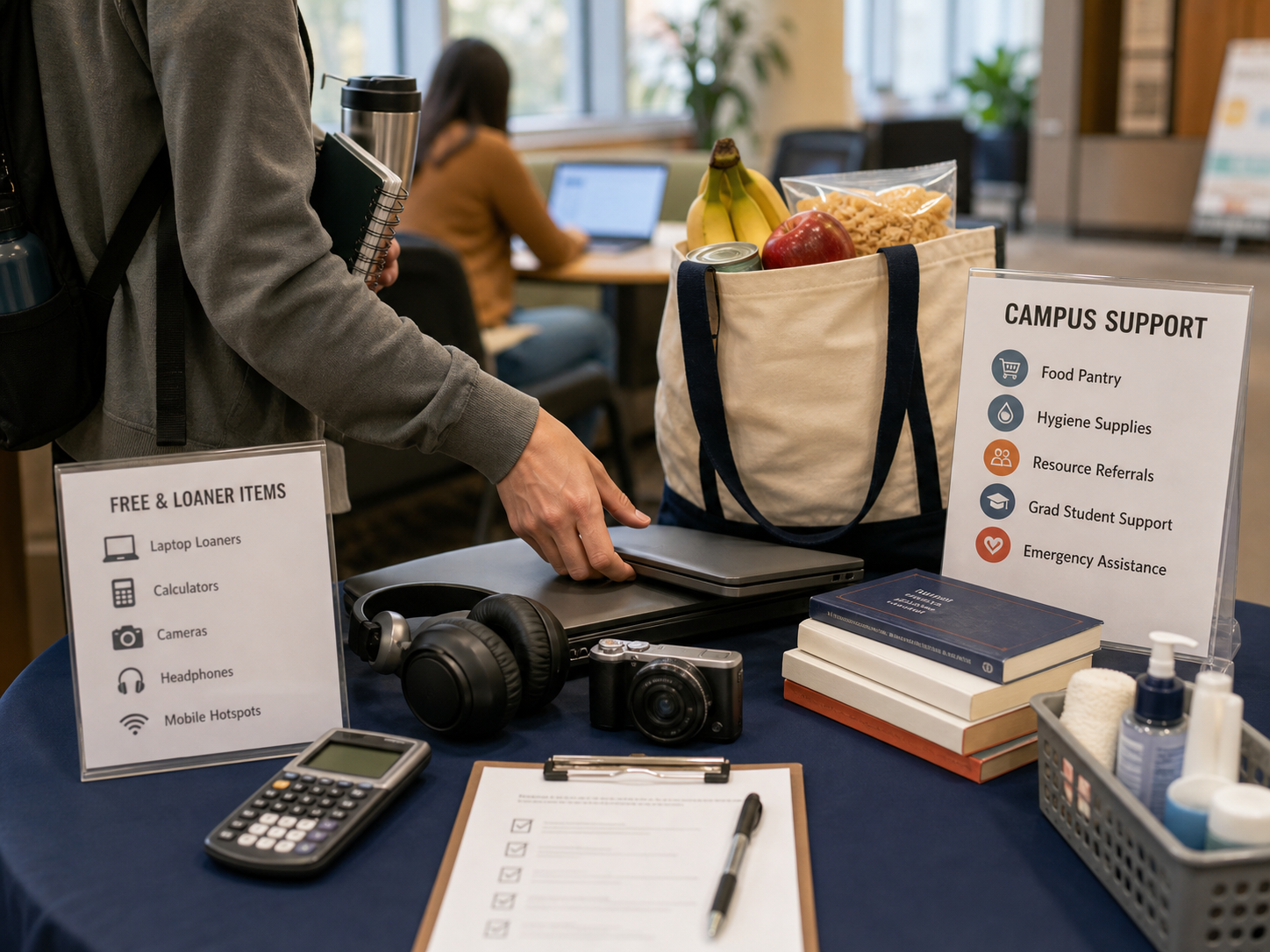
Many graduate students feel awkward using food support, but basic-needs programs exist because students are part of the community. Start with your campus food pantry, graduate student union, dean of students office, emergency aid fund, mutual aid groups, and local food banks. Some pantries offer fresh food, grocery cards, hygiene products, baby supplies, or emergency meal swipes.
SNAP can be available to some graduate students, but the rules are more complicated than ordinary household eligibility. USDA guidance says students enrolled at least half-time in an institution of higher education are generally eligible only if they meet a student exemption and all other SNAP rules. Exemptions can include working enough hours, participating in work-study, having a dependent child, disability-related exceptions, or other state-specific pathways. Apply through your state agency or ask your campus basic-needs office to screen you.
Tax help is another overlooked free resource. The IRS Free File program offers guided tax software at no cost for taxpayers whose adjusted gross income is at or below the current threshold, and the IRS Volunteer Income Tax Assistance program provides free basic tax return preparation to qualified individuals. Graduate students with stipends, assistantships, fellowships, multiple W-2s, 1098-T forms, or moving expenses should not assume paid tax software is the only option.
5. Look for hidden campus perks that feel boring but save real money
The most underrated grad student freebies are usually hidden in plain sight. Search your university website for “software catalog,” “technology lending,” “student basic needs,” “graduate professional development,” “library workshops,” “emergency aid,” “commuter benefits,” and “student legal services.” These pages are rarely glamorous, but they are often where the highest-value benefits live.
Possible campus-dependent freebies include laptop loans, microphones, cameras, tripods, calculators, lab coats, lockers, poster-printing allowances, statistical consulting, writing-center appointments, thesis bootcamps, grant-writing workshops, resume reviews, professional headshots, mock interviews, transit passes, bike repair, campus gym access, group fitness classes, counseling sessions, flu shots, legal consultations, childcare referrals, and emergency grants.
Graduate students should also ask departments about conference volunteering, travel awards, professional society memberships, dissertation completion grants, open-access publishing support, poster templates, teaching certificates, and free printing for teaching assistants. These are not always advertised because departments assume students already know about them. New students rarely do.
A practical tip: make a one-page “free resources tracker” with three columns: benefit, renewal date, and contact person. Add your school email expiration date, software license renewal dates, cloud credit expiration dates, library access changes, and what to download before graduation. The best time to claim graduate student perks is while your student status is active.
How to claim more free stuff without wasting time
- Verify your student identity once. Set up your official school email, student ID, GitHub Education verification, and any student-verification platforms your school uses.
- Check official pages first. Search the tool name plus “student,” “education,” or “academic license” before trusting social posts or outdated freebie lists.
- Ask your department administrator. They often know about travel funds, printing codes, software licenses, and emergency resources before students do.
- Use benefits for academic work only when required. Educational licenses often forbid paid consulting, commercial products, or employer work.
- Set cancellation and renewal reminders. Free trials, annual education licenses, cloud credits, and student subscriptions can expire or convert to paid plans.
Uncommon FAQ about free stuff for graduate students
Can part-time graduate students get student freebies?
Yes, sometimes. Many software programs only require current enrollment and a valid institutional email, while public benefits such as SNAP use their own definitions of half-time enrollment. Always check the eligibility page, because “student” can mean different things in software licensing, tax filing, public benefits, and campus access.
Do international graduate students qualify for these perks?
Often, but not always. Global software offers such as Zotero, ORCID, Overleaf Free, JetBrains education access, GitHub Education, and Autodesk Education may be available in many countries, subject to verification and local rules. Public benefits, tax help, and food assistance are country- and visa-specific, so international students should check the international student office before applying.
Can I use free educational software for freelance or paid research work?
Usually no. Many educational licenses are restricted to learning, teaching, academic research, or non-commercial use. If a lab, company, startup, or client is paying for the work, check the license terms and ask your advisor or IT office before using a student license.
What free things should I claim before graduation?
Before your student status ends, export your Zotero library, download important cloud files, transfer Canva or Notion materials to a personal account, save course certificates, archive your GitHub repositories, update your ORCID profile, and ask the library how long alumni database access lasts. Graduation is also the right time to cancel trials that will start billing.
Are AI tools free for graduate students?
Some AI features are free through general free plans, campus contracts, Microsoft education access, Google or cloud-learning programs, or temporary student promotions. Avoid assuming a social-media claim is current. AI student offers change quickly, and some require a payment method, specific country, personal account, or school verification.
Final takeaway
The best free stuff for graduate students is the set of tools and support systems that protects your time, health, and money. Start with your university software portal and library, then claim verified student tools such as Microsoft 365 Education, GitHub Student Developer Pack, JetBrains, Notion, Autodesk, Zotero, Overleaf, ORCID, Azure for Students, AWS Educate, and Google Skills credits. Finally, treat food, tax, legal, health, and professional-development support as normal parts of graduate funding—not favors.
Update note: Student freebies, software licenses, cloud credits, public benefits, and campus support programs can change. Check the official program page or your university portal before relying on a benefit.


